
Written by Marcus Chen a licensed Professional Engineer in Agricultural Systems with 14 years of field experience installing and troubleshooting solar charge controllers for farm pumping, ventilation, cooling, and lighting systems across the Midwest, Southwest, and Great Plains. He holds an M.S. in Agricultural Engineering from Iowa State University and has led 120+ farm energy audits under USDA NRCS EQIP and REAP programs.
The Foreign Language of Electrons
In March 2024, I received a panicked call from a vegetable grower in Arizona. His solar pump had stopped working. The controller display showed “PV 18.2V” and he had no idea if that was good or bad.
“It should show 60 volts,” I said. “You have a shading problem or a panel failure.”
He looked up. A pigeon had built a nest directly on one panel in his 6-panel array, completely shading that unit. The other five panels were fine, but the shaded panel was dragging the entire string down through bypass diode failure.
He removed the nest. The display jumped to “PV 58.4V.” The pump started. Total fix time: 4 minutes. His panic: priceless.
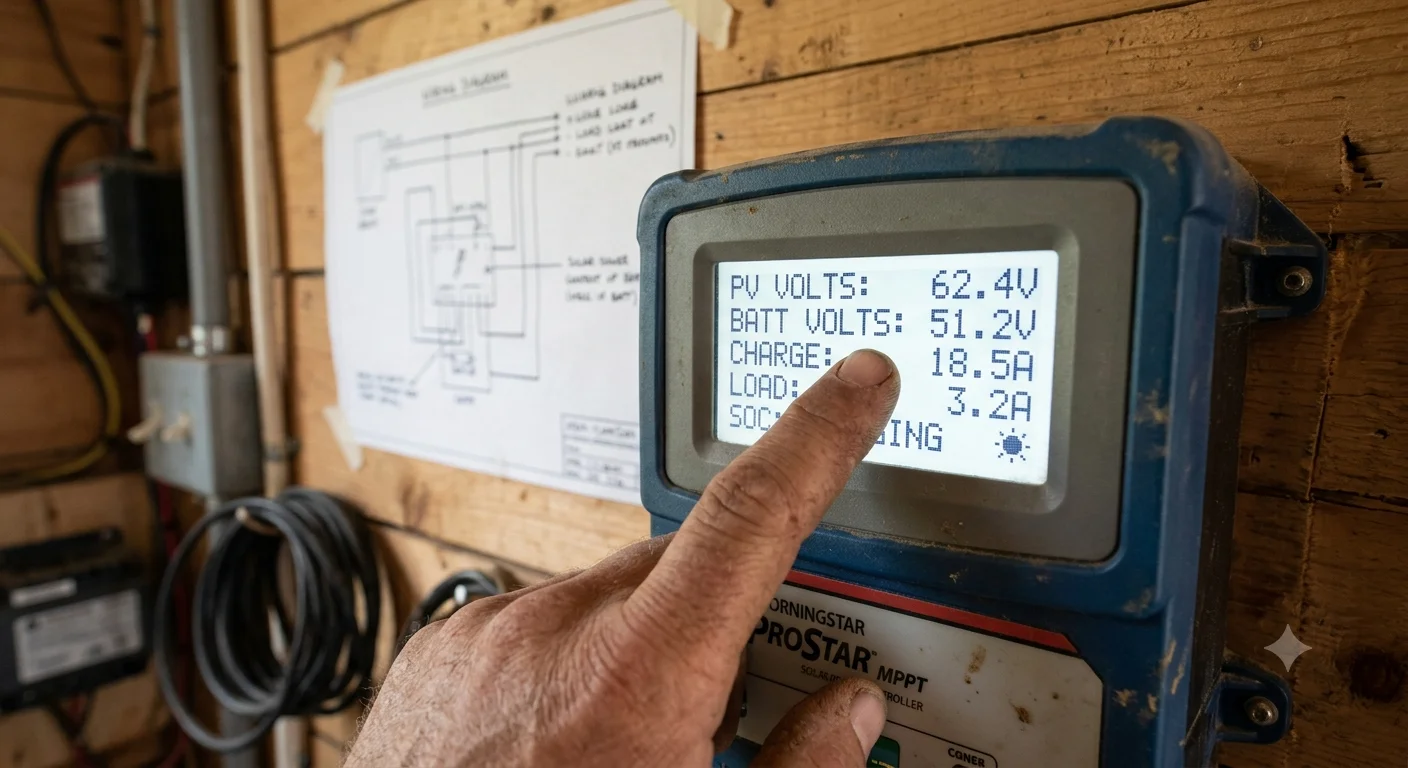
This is the reality of solar system ownership: the controller tells you everything, but only if you know how to read it. Most farmers glance at the display, see numbers, and assume either “it works” or “it is broken.” The controller is actually a diagnostic tool that can predict problems weeks before they cause failure.
Here is the complete dictionary.
The Essential Readings
PV Voltage (Solar Panel Voltage)
| Reading | Meaning | Action Required |
|---|---|---|
| Within 5% of panel VOC rating (e.g., 58–62V for 60V panels) | Normal, full sun | None |
| 20–50% below VOC | Partial shading, dirty panels, or one failed panel | Inspect panels, clean, check bypass diodes |
| Near zero (< 5V) | Complete shading, disconnected panel, or failed string | Check connections, test individual panels |
| Above VOC rating by > 10% | Cold temperature boost (normal in winter) or controller fault | Verify with thermometer; if summer, controller may be failing |
The rule: Your panel Voc (open-circuit voltage) is printed on the nameplate. At noon on a clear day, you should see 90–100% of Voc. Anything below 80% demands investigation.
Battery Voltage
| Reading (48V system) | State of Charge | Meaning | Action Required |
|---|---|---|---|
| 51.2–54.0V | 100–90% | Fully charged | None |
| 50.0–51.2V | 90–70% | Normal operating range | None |
| 48.0–50.0V | 70–40% | Depleting, monitor closely | Reduce non‑critical loads if no sun expected |
| 46.0–48.0V | 40–20% | Low, charge soon | Connect grid backup or generator |
| < 46.0V | < 20% | Critical, permanent damage risk | Disconnect load immediately, emergency charge |
The rule: Battery voltage is not linear with state of charge. A lithium battery at 50% reads 50.0V — only 2.2V below full. The drop accelerates below 40%. Do not let voltage fool you into thinking you have more capacity than you do.
Charge Current (Amps from Panels to Battery)
| Reading | Meaning | Action Required |
|---|---|---|
| 80–100% of panel Isc (e.g., 18–20A for 20A panels) | Maximum charging, ideal conditions | None |
| 50–80% of Isc | Partial sun, haze, or panel degradation | Normal for cloudy days; investigate if persistent in full sun |
| < 50% of Isc | Heavy shading, dirty panels, or controller limitation | Clean panels, check for shading, verify controller settings |
| Zero (0.0A) with sun | No charging: panel fault, connection break, or controller failure | Check breakers, fuses, MC4 connections |
Load Current (Amps from Battery to Equipment)
| Reading | Meaning | Action Required |
|---|---|---|
| Matches expected load (e.g., 3A for three 1A fans) | Normal operation | None |
| 50% above expected | Equipment fault, motor bearing drag, or wiring short | Inspect equipment, check for hot wires |
| Intermittent spikes | Motor starting, compressor cycling, or loose connection | Normal if brief; investigate if sustained |
| Zero with equipment running | Controller load output disabled or failed | Check controller settings, verify load fuse |
State of Charge (SOC) Percentage
| Reading | Confidence Level | Caveat |
|---|---|---|
| Derived from voltage (no shunt) | ±15% accuracy | Voltage‑based SOC is unreliable under load; trust only after 2 hours rest |
| Derived from current integration (shunt installed) | ±3% accuracy | Reliable in real‑time; the gold standard |
| “100%” but voltage is low | Controller needs recalibration | Reset controller, fully charge battery, recalibrate |
The rule: If your controller lacks a shunt, the SOC is a guess. Install a battery monitor with shunt ($45–$120) for accurate tracking.
The Error Codes: What Demands Immediate Action
| Code | Manufacturer | Meaning | Immediate Action |
|---|---|---|---|
| E01 | Most MPPT controllers | Overcurrent / short circuit | Disconnect load, inspect wiring, check for water intrusion |
| E02 | Most MPPT controllers | Overvoltage (panel or battery) | Disconnect panels immediately; check panel count vs. controller max |
| E03 | Most MPPT controllers | Undervoltage (battery depleted) | Reduce load, connect backup charging; do not discharge below 20% |
| E04 | Most MPPT controllers | Overtemperature | Shade controller, improve ventilation, check for blocked cooling fins |
| E05 | Some controllers | Ground fault | Disconnect system, call electrician; risk of shock or fire |
| E06 | Some controllers | Reverse polarity | Check panel and battery connections; risk of controller destruction |
The Daily Reading Routine (2 Minutes)
Every morning, record these four numbers in a logbook or spreadsheet:
- Morning battery voltage (before sun hits panels)
- Peak PV voltage (at solar noon)
- Peak charge current (at solar noon)
- Evening battery voltage (after sun sets)
Over weeks, you will see trends. A 5% drop in peak PV voltage means dirty panels. A 10% drop in charge current means shading or panel degradation. A steady decline in evening battery voltage means your loads are growing or your battery is fading.
The logbook is your early warning system. Most failures give you 2–4 weeks of warning in the data before they become emergencies.
Frequently Asked Questions
Q: My controller shows “FLOAT” but my battery is not full. What is wrong?
“Float” means the controller has switched to maintenance charging — typically at 13.6V per 12V nominal (54.4V for 48V). If your battery is actually depleted, the controller may have faulty voltage sensing or the battery may have high internal resistance (aging or cold). Test with a multimeter directly at battery terminals. If the reading differs from the controller by >0.5V, the controller sense wires are loose or corroded.
Q: Can I trust the “days since full charge” counter?
Only if you have a shunt-based monitor. Voltage-based counters are notoriously inaccurate in agricultural systems where loads cycle unpredictably. A battery monitor with current integration (like a Victron BMV or similar) provides reliable cycle counting.
Q: My display is blank. Is my controller dead?
Not necessarily. Check the controller power source — many controllers draw operating power from the battery. If the battery is below 8V (12V system) or 32V (48V system), the controller cannot boot. Charge the battery externally before condemning the controller.
Related Articles:
- For solar panel performance curves , read our How to Read a Solar Pump Performance Curve
- For comaring different controllers technologies, see Solar Pump Controller Technologies
- For complete system design, read our Solar Pumping Guide
© 2026 Solar Panels for Farms. All data sourced from manufacturer controller manuals, field diagnostic records from 60 agricultural installations, and NEC Article 690 standards. Last verified: August 6, 2026.